


Student Planner Notion Template — Academic Success System
Student Planner Notion Template — Academic Success System
You're not lazy. You just don't have a system.
Every semester starts the same way — you promise yourself this time will be different.
Then week 3 hits. Assignments pile up, deadlines blur together, and you're studying the wrong thing at midnight because you forgot what's actually due tomorrow.
LifeOS Student Planner fixes that.
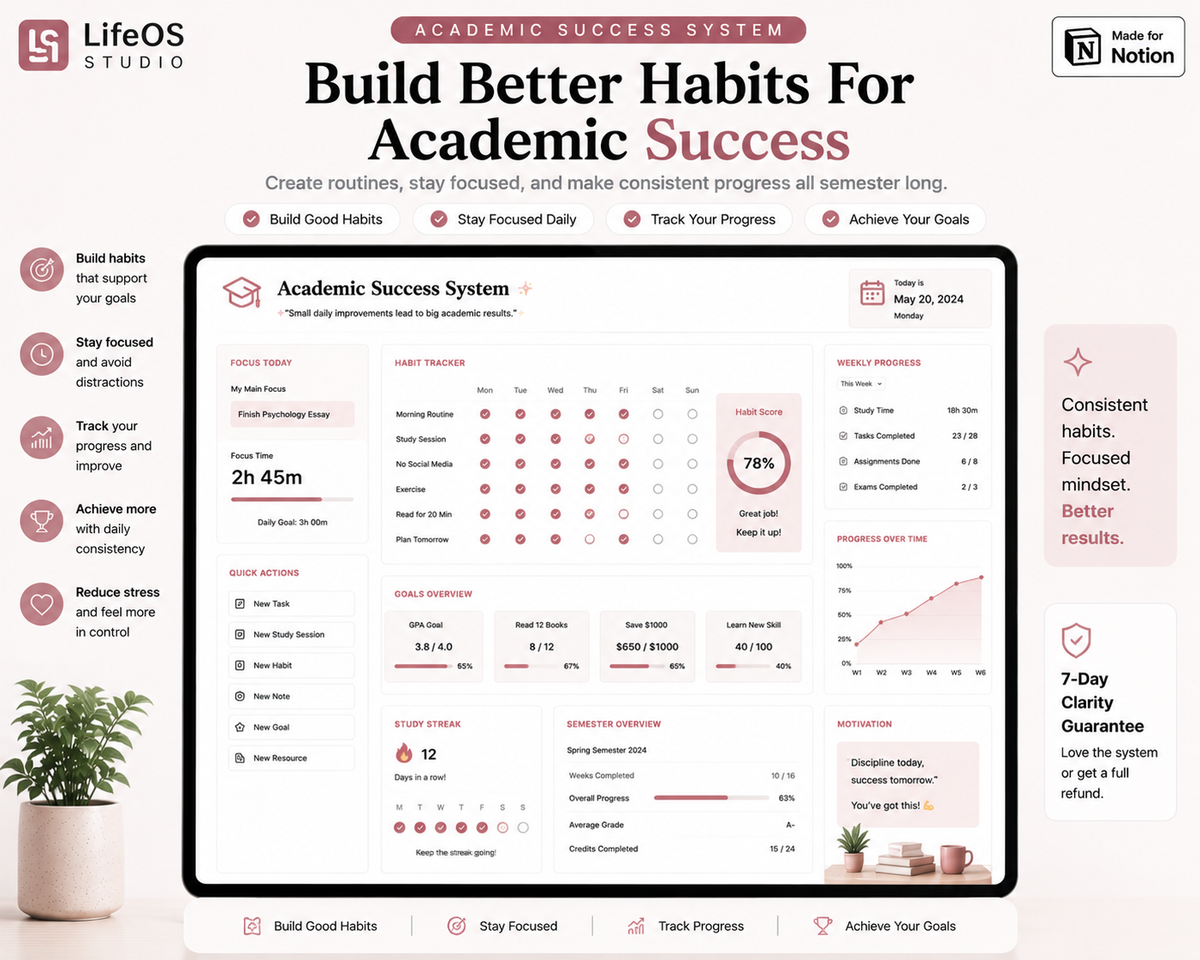
One dashboard. Every class, every deadline, every goal — connected. Set up in under 5 minutes.



Safe payment on our website


BUNDLE & SAVE
Couldn't load pickup availability
The customer purchases the product from the store.
Instant access is delivered immediately after payment.
The customer receives a Notion duplicate link to add the system to their workspace.
A simple setup guide helps them get started quickly.
They can immediately start organizing their life and workflow.

Student Planner Notion Template — Academic Success System
What students say after actually using it
Every doubt someone had before buying — answered by students who tried it anyway.


Still have questions?
Straight answers, before you decide.
Totally get it — $49.99 is real money, and there are plenty of free templates floating around on YouTube and Pinterest. The logical question is: "Why pay when I can get something for free?"
The problem isn't the free template itself — it's that most of them are thrown together without a real system connecting your classes, deadlines, and goals. You end up spending more time trying to understand and customize it than actually studying, and you never quite get there. LifeOS Student Planner, on the other hand, is built specifically for students — a full dashboard, assignment tracker, and study sessions, all connected from day one. The time you'd lose "building" a free template, you save instantly.
And to make sure you feel completely safe, you get a 7-Day Clarity Guarantee: if you try it and don't feel more organized and focused, you get a full refund — no questions asked.
So the $49.99 isn't really a cost — it's an investment in time you're already losing trying to build something yourself with no results. And if it doesn't work for you, there's zero risk.
That's a real, honest fear — a lot of people buy digital products, tell themselves "I'll set it up later," and then... never do.
But here's the difference: setup isn't something you're figuring out alone. The template comes fully built — you just duplicate it, and there's a step-by-step guide showing you exactly where to go. Most students get it set up in under 5 minutes, no need to "learn Notion" first.
And if you hit a wall at any point, you've got direct support (Setup Help) — you're not on your own.
To make it completely risk-free: you get a 7-Day Guarantee. If it turns out you're not getting value from it, even after setting it up, you get your money back — no conditions.
That's a legitimate fear — a lot of people buy organization tools and stop using them after a couple weeks.
Here's the difference: this isn't just a "tool" you have to stay disciplined about using — it's built to show you what to do each day (Focus Today, Deadlines, Habit Tracker), so it does the reminding for you instead of relying on your willpower.
And if after all that it still doesn't work for you, you've got the 7-Day Clarity Guarantee — full refund, no conditions.
That's a fair thing to question — a lot of "guarantees" online are just words on a page that nobody honors when you actually try to use them.
Here's the proof: the refund process is simple and direct — you reach out, explain that the system didn't help you feel more organized within 7 days, and you get your money back. No forms to fill out, no "prove it" requirements, no runaround. It's built into how we support customers, not as a marketing trick, but because we'd rather you leave happy than stuck with something that isn't working for you.
And realistically — offering a real guarantee only makes sense if we're confident the product delivers. If it didn't work most of the time, refunding everyone would cost more than it's worth to us. So the guarantee itself is proof we trust the system.
Fair point — technically, yes, it's still Notion underneath, so the skepticism makes sense.
Here's the real difference: free templates are usually built by one person for their own use, then shared as-is — no structure connecting your classes, deadlines, habits, and goals together. You end up spending hours customizing it, fixing broken formulas, or figuring out why a database doesn't sync the way you need. LifeOS Student Planner is built specifically as a complete system — every part (Dashboard, Assignment Tracker, Study Planner, Habit Tracker) is already connected and tested, so it works the way a student actually needs it to, right from day one.
And if it turns out it's really "just the same" for you, you've got the 7-Day Guarantee — no risk in finding out.
Totally understandable — the last thing you need is one more thing eating into your time.
Here's the thing though: this isn't something that adds work — it's built to save you time you're already losing. Right now, that time goes into remembering what's due, re-checking your notes app, your calendar, and three different tabs just to figure out what to focus on today. With everything in one connected dashboard, updating it takes seconds — checking a box, logging a session — and it replaces all that scattered checking with one glance each morning.
And if after trying it, it still feels like more work than it saves, you're covered by the 7-Day Guarantee.
Makes sense to ask — nobody wants to buy a template and then discover they need to pay for something else just to use it.
Here's the clarity: Notion itself is free to use for personal accounts — you don't need any paid plan for this template to work fully, on desktop or mobile. You just create a free Notion account (if you don't have one already), duplicate the template into it, and everything works exactly as shown, on your phone, tablet, or laptop, fully synced across all of them.
And if you run into any device or setup issue, that's exactly what Setup Help is for.


Sizing Chart
| US Men | US Women | UK | EU | CM | Inches |
|---|---|---|---|---|---|
| 4 | 5 | 3.5 | 36 | 22.1 | 8.7 |
| 4.5 | 5.5 | 4 | 36.7 | 22.5 | 8.9 |
| 5 | 6 | 4.5 | 37.3 | 22.9 | 9 |
| 5.5 | 6.5 | 5 | 38 | 23.3 | 9.2 |
| 6 | 7 | 5.5 | 38.7 | 23.8 | 9.4 |
| 6.5 | 7.5 | 6 | 39.3 | 24.2 | 9.5 |
| 7 | 8 | 6.5 | 40 | 24.6 | 9.7 |
| 7.5 | 8.5 | 7 | 40.7 | 25 | 9.8 |
| 8 | 9 | 7.5 | 41.3 | 25.5 | 10 |
| 8.5 | 9.5 | 8 | 42 | 25.9 | 10.2 |
| 9 | 10 | 8.5 | 42.7 | 26.3 | 10.4 |
| 9.5 | 10.5 | 9 | 43.3 | 26.7 | 10.5 |
| 10 | 11 | 9.5 | 44 | 27.1 | 10.7 |
| 10.5 | 11.5 | 10 | 44.7 | 27.6 | 10.5 |
| 11 | 12 | 10.5 | 45.3 | 28 | 11 |
| 11.5 | 12.5 | 11 | 46 | 28.4 | 11.2 |
| 12 | 13 | 11.5 | 46.7 | 28.8 | 11.3 |
| 12.5 | 13.5 | 12 | 47.3 | 29.3 | 11.5 |
| 13 | 14 | 12.5 | 48 | 29.7 | 11.7 |
| 3.5 | 14.5 | 13 | 48.7 | 30.1 | 11.9 |
| 14 | 15 | 13.5 | 49.3 | 30.5 | 12 |
| 15 | 16 | 14.5 | 50.7 | 31.4 |
12.4 |
Give your customers further information about choosing the correct size.